How to Apply to the Early College Credit Program
Follow these steps to complete your UW-Green Bay application as a high school non-degree student. It may look like a lot, but each step is simple. Use this guide while you fill out the Universities of Wisconsin application.
Step 1: Create an Account or Sign in
Go to the Universities of Wisconsin application portal and:
- Create an account or
- Sign in if you've already applied to another Universities of Wisconsin school.
Step 2: Begin a New Application
Select Start Application.
Step 3: Identify Yourself as a High School Non-Degree Student
Answer the questions as follows:
- Are you applying as a degree-seeking student? No.
- Are you a U.S. Citizen? Answer accordingly.
- Have you graduated from high school/secondary school or earned your GED/HSED? No.
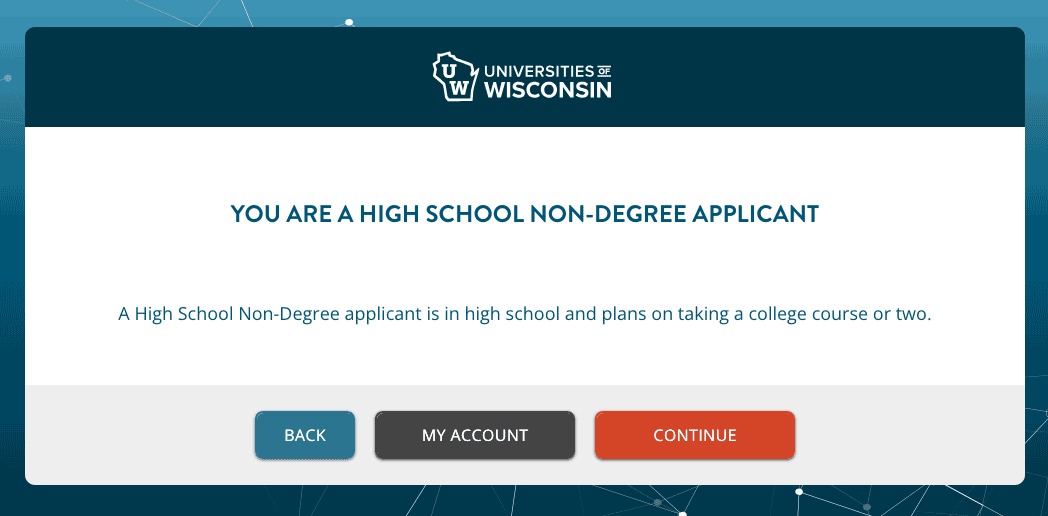
You should now see a message confirming you are a high school non-degree applicant.
If you see something different, go back and correct your answers. Otherwise, continue.
Step 4: Select UW-Green Bay & Your Program
Answer the questions as follows:
- Where do you want to go? UW-Green Bay
- Choose your program: Early College Credit Program
- When would you like to start school? Select your intended semester.
- Will you still be attending high school during [your selected semester]? Yes
Step 5: Review Your Application Summary
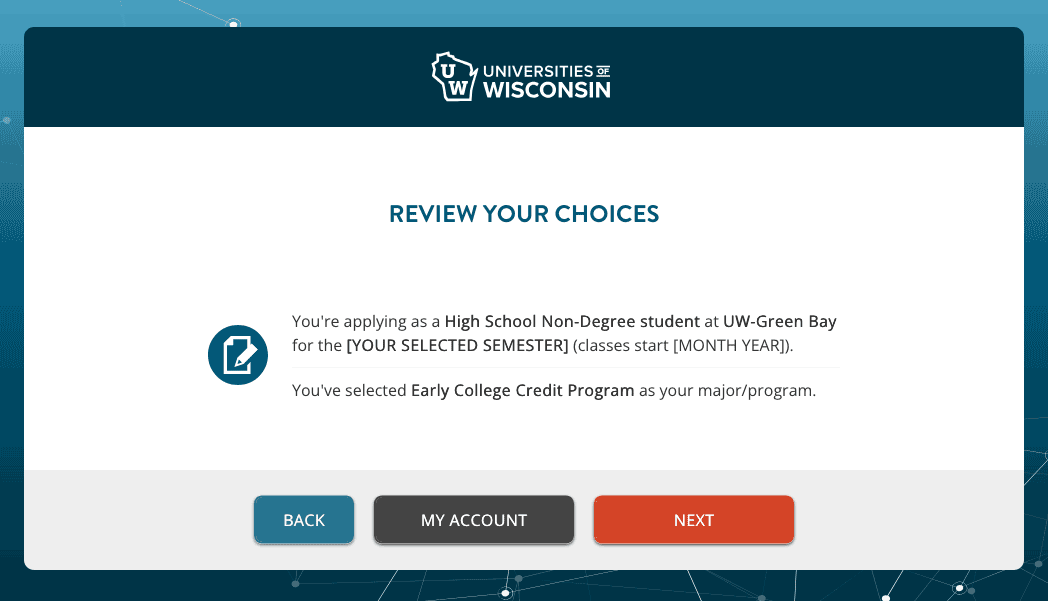
After selecting UW-Green Bay and your program, you should now see a message confirming the following.
- You're applying as a High School Non-Degree student at UW-Green Bay for the [Your selected Fall/Spring/Summer Year] term (classes start [Month Year when your term starts]).
- You've selected Early College Credit Program as your major/program.
If you see something different, go back and correct your answers. Otherwise, continue.
Step 6: Enter Your Personal Information
You will move into Personal Information, starting with the Basic section and continuing through Additional, Contact, Parent/Guardian and Residency. Most questions are straightforward. Review your answers carefully and complete all required fields. Pay attention to these fields:
Preferred Name (Optional):
If you use a different name than your legal name, you may enter it here. This may appear on class rosters. If you use your legal name, leave this blank.
Form of Identification
You will be asked: “Which form of identification can you provide?”
Options include:
- Social Security Number: If you choose this, you'll be asked for your 9-digit number.
- Tax Identification #: You probably don't have one of these.
- Do Not Want to Provide / Do Not Have: If you choose this, you will get a message about why you should provide a TIN or SSN. There are no tax or financial aid implications for high school dual credit students so you don't need to worry about this. Choose "Close and Accept."
Save and Continue
Once all required fields are completed in each of the Basic, Additional, Parent/Guardian and Residency sections, you will be able to select "Save and Continue"
Parent/Guardian Information
- Don't "Skip Parent Section".
- You only need to provide information for one parent/guardian.
Residency Information
- Residency is determined by the parent section.
- Answer yes to the question: "Are you claiming Wisconsin residency to qualify for the Wisconsin resident tuition rate?"
- Choose "Save and Continue."
Step 7: Add your high school.
- Choose "Add High School". You do not need to upload your transcript.
- Then "Save and Continue".
Step 8: Holistic Background Essay
You don't need to write any kind of essay because you are a high school student earning college credit. But the field is required to proceed.
- Type in the name of your current high school.
- Click Save to apply your changes
- Click Save and Continue
Step 9: Sign and submit your application.
Now you'll have an opportunity to review your application and all that is left is for your digital signature and payment.
- There is no cost to apply for high school dual credit.
- Choose "I Agree" to answer "Do you agree to all of the above?"
- Sign your application in the signature field.
- Choose "Submit Application."
What's Next?
After you submit your application, you will receive a confirmation email to the email address you used to create your account. If you do not get a confirmation email, check your junk folder. If you don't have anything in your junk folder, check to make sure you finished and completed. You will be contacted by UW-Green Bay with your registration confirmation and orientation information before the course begins.

Need Help?
If you have questions or run into issues at any point, please contact the UW-Green Bay Dual Enrollment Services Office at academy@uwgb.edu or 920-360-1235.